arnab@platform:~/posts$cat nixclaw-voice-vision-agent.mdx
↳ ai · 12 min read
Building NixClaw: Giving My AI Agent Eyes and Ears
2026-02-25·by arnab saha·
aimultimodalagentsvoiceopenclawgeminibuilding
I have an AI agent named Nix. It lives on my NAS, runs 24/7, and handles everything from managing my portfolio to ordering food. Over 60 skills connected through OpenClaw.
But it couldn't see. And it couldn't hear.
Every interaction was text. WhatsApp messages, voice-to-text dictation. Useful, but limiting. I wanted to talk to Nix while walking the dog. I wanted it to see what I was looking at through my Meta Ray-Ban glasses and respond in real-time. I wanted the kind of interaction where I could say "what's this building?" and get an answer without pulling out my phone.
This is the story of how I built that, one frustrating workaround at a time.
The first attempt was simple. OpenClaw exposes an API endpoint (/v1/chat/completions) that's compatible with the OpenAI format. My NAS is on the local network. So why not just call it from a Siri Shortcut?
The idea: dictate a question, build a JSON payload, POST it to the OpenClaw gateway, parse the response, speak it aloud. Six Shortcuts blocks. Should take 20 minutes to set up.
It took an evening. Siri Shortcuts has a talent for subtle breakage: unescaped quotes in dictation, whitespace in headers, JSON responses that won't auto-parse. Each one is a 30-minute rabbit hole that makes you question your life choices.
But it worked. "Hey Siri, Ask Nix," speak a question, get a spoken response from my AI agent. Hands-free, on my phone.
It was genuinely cool for a day or two. Then the limitations hit:
A proof of concept, not a product. I needed real-time bidirectional audio, and I needed vision.
Then I found VisionClaw.
VisionClaw is an open-source iOS app that connects to the Gemini Live API over WebSocket. It streams video from Meta Ray-Ban smart glasses (or your iPhone camera) to Gemini at ~1 frame per second, while maintaining a bidirectional audio channel. You talk, Gemini sees what you see, and responds in real-time with native audio. Not text-to-speech, actual Gemini voice output.
This was exactly the real-time voice + vision layer I was missing. The glasses stream video, the app sends frames to Gemini, Gemini responds instantly. No dictation step, no JSON parsing, no Siri intermediary. Just talk.
But VisionClaw had its own limitations:
No agent name routing. VisionClaw did have OpenClaw connectivity, it could technically call the gateway. But there was no way to address your agent by name. Say "Ask Nix to add milk to my list" and Gemini had no concept of who "Nix" was or how to route that request. Tool calls would fire inconsistently, conversations would get missed, and there was no reliable keyword detection to trigger the execute flow. The plumbing existed, but the routing didn't.
Foreground only. Lock your phone or switch apps? Session dead. For something you're supposed to use while walking around with glasses, this was a dealbreaker.
No configuration. API keys hardcoded. No way to point it at your own agent. Fork and edit source code, or nothing.
So I forked it.
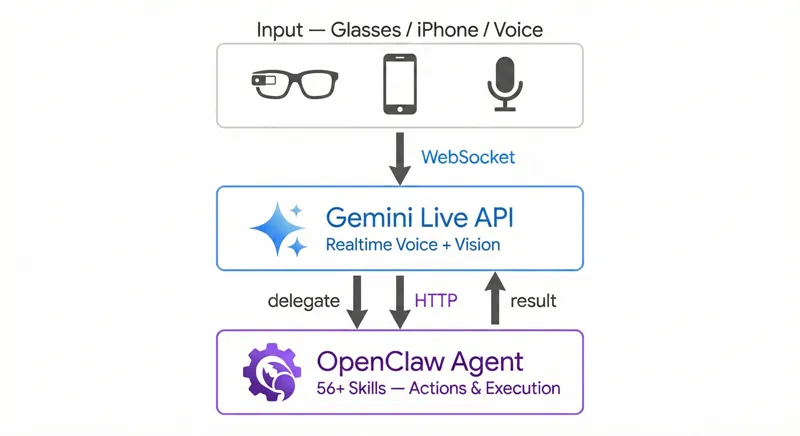
The core idea was simple: take VisionClaw's real-time voice + vision pipeline and connect it to Nix's 60+ skills via OpenClaw.
Gemini Live supports function calling. You declare tools in your session config, and Gemini can invoke them mid-conversation. I added a single tool called execute:
Tool(functionDeclarations: [
    FunctionDeclaration(
        name: "execute",
        description: "Route a task to the OpenClaw agent",
        parameters: ["task": .string(description: "Natural language task")]
    )
])
That's it. One tool. Gemini figures out when to use it based on context. If I say "what am I looking at?", Gemini handles it directly using the camera feed. If I say "send a message to John", Gemini calls execute and routes it through OpenClaw.
The flow:
"Add milk to my shopping list"
    → Gemini: "Sure, adding that now" (speaks immediately)
    → Gemini sends toolCall: execute(task: "Add milk to shopping list")
    → iOS app catches the tool call
    → HTTP POST to OpenClaw gateway
    → Nix executes the task (adds to shopping list)
    → Tool response returns to Gemini
    → Gemini: "Done, milk has been added to your shopping list"
The key insight: Gemini gives a verbal acknowledgment before sending the tool call. So the user gets immediate feedback while the action executes in the background. Natural conversation flow, not awkward silence.
The second big addition was background mode. VisionClaw's audio session died the moment you left the app. For NixClaw, I needed the conversation to survive locking the phone.
iOS has a BGTaskScheduler and background audio capabilities, but they're designed for music players, not bidirectional AI conversations. The trick is declaring your app as a background audio app and keeping the audio session active:
.voiceChat audio category with .allowBluetooth for AirPodsNow I can start a conversation, lock my phone, put it in my pocket, and keep talking through AirPods or the glasses speaker. The AI keeps listening, keeps seeing (if glasses are connected), keeps responding.
NixClaw supports three interaction modes:
Audio Only is probably the mode I use most. It's basically what the Siri Shortcut was trying to be, but with real-time conversation, follow-ups, and the ability to actually do things.
I wanted NixClaw to be open source, usable by anyone with an OpenClaw setup, while keeping my personal config (Nix's name, my gateway token, my endpoints) separate.
The solution: xcconfig files for build-time settings, UserDefaults for runtime settings.
// Config/NixClaw.xcconfig (template, committed)
GEMINI_API_KEY =
DEFAULT_OPENCLAW_HOSTNAME =

// Config/Nix.xcconfig (personal, gitignored)
GEMINI_API_KEY = my-actual-key
DEFAULT_OPENCLAW_HOSTNAME = 192.168.1.70
Build-time settings (app name, icon, bundle ID) come from xcconfig. Runtime settings (API keys, endpoints, assistant name) can be configured in-app through a setup wizard that appears on first launch. No code editing required for either path.
Building NixClaw taught me something about AI assistants that isn't obvious from the demos: the last mile is 80% of the work.
Getting Gemini to understand speech? That's the easy part, Google solved it. Getting an LLM to describe what it sees? Solved. Having an agent with 60 tools? Solved (OpenClaw handles that).
The hard parts:
The infrastructure pieces (LLM, tools, audio streaming) are commodities now. The differentiation is in how smoothly they compose together.
One unexpected outcome of this project: I now have a conversational iOS build pipeline.
Here's how it works: I'm chatting with Nix over WhatsApp, and I notice a bug or want a feature. I describe what I want changed. Nix writes the code, commits to GitHub, and a self-hosted runner on my Mac Mini picks up the build. About 30 seconds later, the new version is wirelessly installed on my iPhone via devicectl.
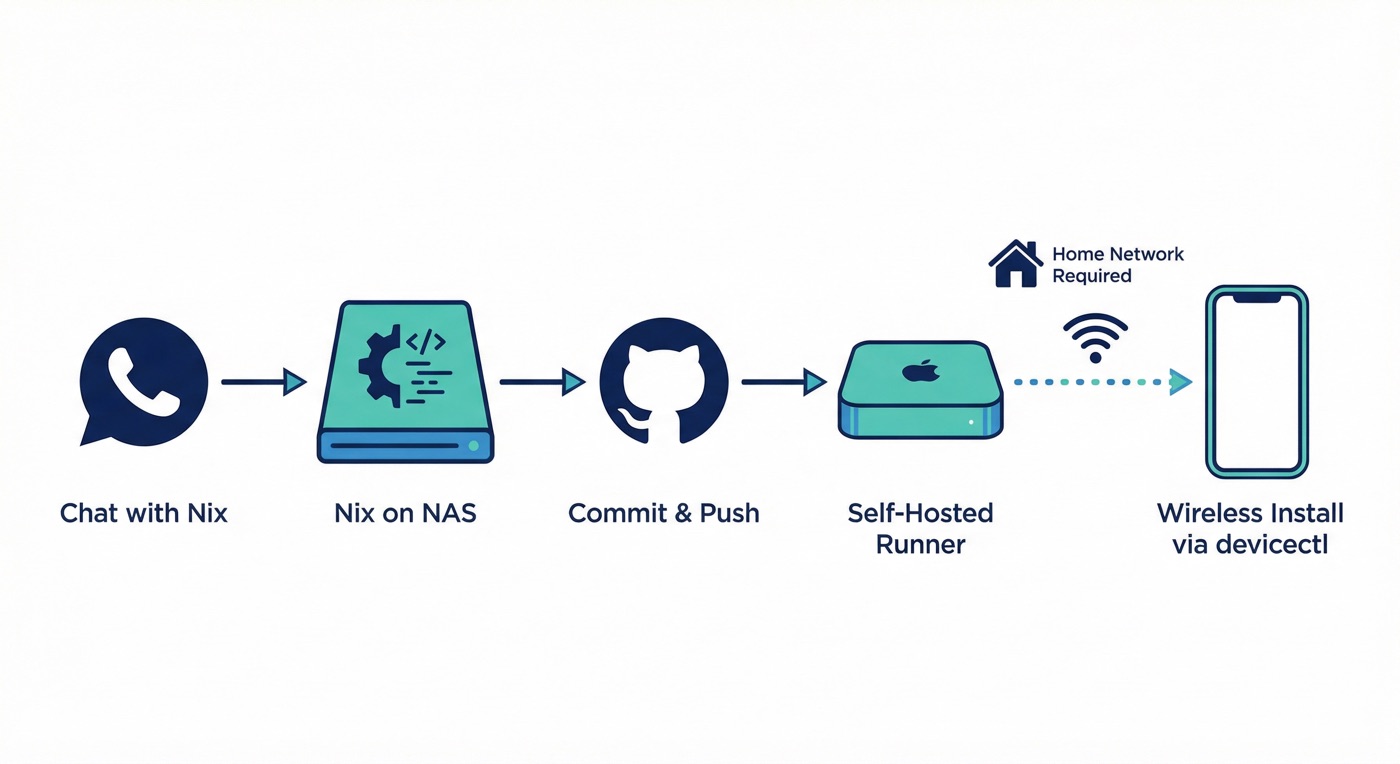
The catch: the wireless install only works when I'm on home Wi-Fi. My iPhone needs to be reachable by the Mac Mini for devicectl to push the build. So if I'm at a coffee shop downtown, the build succeeds but the install waits until I'm back home.
No Xcode GUI. No TestFlight. No touching my laptop. From "hey, can you make the status indicator green instead of blue" to running the updated app, all through chat.
It's a small thing, but it changes how I think about iteration. The feedback loop is tight enough that I can treat the iOS app like a script I'm tweaking, not a binary I'm shipping.
NixClaw is open source on GitHub. It's a working iOS app that gives any OpenClaw agent eyes, ears, and the ability to act.
What I'm exploring next:
The line between "AI assistant" and "AI companion" is somewhere in the gap between text and multimodal. NixClaw is my attempt to cross it.
NixClaw on GitHub. Fork of VisionClaw. Built with Gemini Live API, Meta Wearables DAT SDK, and OpenClaw.